


Linking your Aadhar Card and PAN card is a very simple process. It is important to link the two documents to ensure a smooth financial process and to avail various government benefits. In this blog post, we will show you how to easily link your Aadhar Card and PAN card in 5 easy steps. With these instructions, you’ll be able to quickly link your Aadhar Card and PAN card with ease.

1. Overview
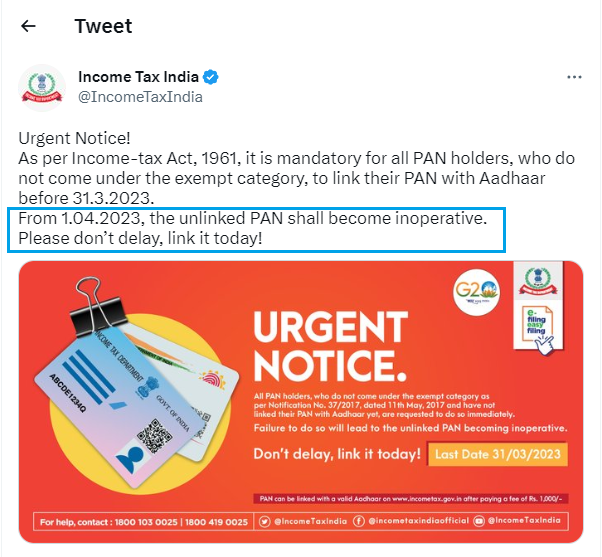
For new applicants of PAN card, the Aadhaar PAN linking is done automatically during the application stage. For existing PAN holders, who were allotted PAN on or before 01-07-2017 it is mandatory to link PAN with Aadhaar. The Link Aadhaar service is available to individual taxpayers (both registered and unregistered on e-Filing Portal). If you do not link your PAN with the Aadhaar till 30th June 2023, your PAN will become inoperative. However, people who fall under the exempted category will not be subject to the effects of PAN becoming inoperative.
2. Prerequisites for availing this service:
- Valid PAN
- Aadhaar number
- Valid mobile number
3. How to make payment of Aadhaar Pan link fee on e-Filing Portal
Step 1: Visit the e-Filing Portal Home page and click on Link Aadhaar in Quick Links section. Alternatively, login to e-filing portal and click on Link Aadhaar in Profile section.
Step 2: Enter your PAN and Aadhaar Number.
Step 3: Click on Continue to Pay Through e-Pay Tax.
Step 4: Enter your PAN, confirm PAN, and any mobile number to receive OTP.
Step 5: Post OTP verification, you will be redirected to e-Pay Tax page.
Step 6: Click on Proceed on the Income Tax tile.
Step 7: Select the relevant Assessment Year and Type of Payment as Other Receipts (500) and click Continue.
Step 8: Applicable amount will be pre-filled against Others. Click Continue.
Now, challan will be generated. On the next screen, you have to select the mode of payment. After selecting the mode of payment, you will be re-directed to the Bank website where you can make the payment.
Post payment of fee, you can link your Aadhaar with PAN on the e-Filing Portal.
4. How to Submit the Aadhaar PAN link request post Payment of Fee
Aadhaar PAN link request can be made both in the Post login as well as in Pre-login mode.
The steps for each of the mode are detailed below one by one:
Submit Aadhaar PAN link Request (Post login):
Step 1: Go to e-filing Portal > Login > On Dashboard, in Profile section under the Link Aadhaar to PAN option, click Link Aadhaar.
Or alternatively, click on Link Aadhaar in personal details section.
Step 2: Enter the Aadhaar number and click on Validate.
Submit Aadhaar PAN link Request (Pre-login):
Step 1: Go to e-filing portal home page and click on Link Aadhaar under Quick Links.
Step 2: Enter the PAN and Aadhaar and click Validate.
Step 3: Enter the mandatory details as required and click on Link Aadhaar.
Step 4: Enter the 6-digit OTP received on mobile number mentioned in the previous step and click on Validate.
Step 5: Request for link of Aadhaar has been submitted successfully, now you can check the Aadhaar-PAN link status.
Scenario 1: If the payment details are not verified on the e-Filing Portal.
Step 1: After validating PAN and Aadhaar, you will see a pop-up message that
” Payments details not found”. Click on Continue To Pay Through e-Pay Tax for the payment of fee as payment of fee is the pre-requisite to submit the Aadhaar PAN link request.
Note: If you have already paid the fee, then wait for 4-5 working days. After that, you can submit the request.
Note: Please ensure you link your correct Aadhaar with your PAN.
If Aadhaar and PAN are already linked or PAN linked to some other Aadhaar or vice versa, you will get following errors:
Scenario 2: PAN is already linked with the Aadhaar or with some other Aadhaar:
You may need to contact your Jurisdictional Assessing Officer and submit a request for delinking your Aadhaar with incorrect PAN.
To know your AO’s contact details, visit https://eportal.incometax.gov.in/iec/foservices/#/pre-login/knowYourAO(Prelogin)
Or https://eportal.incometax.gov.in/iec/foservices/#/dashboard/myProfile/jurisdictionDetail (Post login)
Scenario 3: If you have made payment of Challan and payments and details are verified at e-filing Portal.
Step 1: After validating PAN and Aadhaar you will see a pop-up message that ”Your payment details are verified”. Please click Continue on the pop-up message to submit Aadhaar PAN linking request.
Step 2: Enter the required details and click on Link Aadhaar button.
Step 3: Request for link of Aadhaar PAN has been submitted successfully, now you can check the Aadhaar PAN link status.
5. View Link Aadhaar Status (Pre-Login)
Step 1: On the e-Filing Portal homepage, under Quick Links, click Link Aadhaar Status.
Step 2: Enter your PAN and Aadhaar Number, and click View Link Aadhaar Status.
On successful validation, a message will be displayed regarding your Link Aadhaar Status.
If the Aadhaar-PAN link is in progress:
If the Aadhaar-PAN linking is successful:
6. View Link Aadhaar Status (Post-Login)
Step 1: On your Dashboard, click Link Aadhaar Status.
Step 2: Alternatively, you can go to My Profile > Link Aadhaar Status.
(If your Aadhaar is already linked, Aadhaar number will be displayed. If Aadhaar is not linked Link Aadhaar Status is displayed).
Note:
- If the validation fails, click Link Aadhaar on the Status page, and you will need to repeat the steps to link your PAN and Aadhaar.
- If your request to link PAN and Aadhaar is pending with UIDAI for validation, you will need to check the status later.
- You may need to contact the Jurisdictional AO to delink Aadhaar and PAN if:
- your Aadhaar is linked with some other PAN
- your PAN is linked with some other Aadhaar
On successful validation, a message will be displayed regarding your Link Aadhaar status.
DISCLAIMER:
This user manual is issued for information and general guidance purposes only. Taxpayers are advised to refer to relevant circulars, notifications, rules and provision of the the I.T. Act for precise information, interpretations, clarifications applicable to their cases. The department will not be responsible for actions taken and/or decisions made based on this user manual.